
学習目標
この回が終わる頃には、以下のことができるようになります:
- インライン数式とディスプレイ数式の使い分けができる
- 基本的な数学記号(分数、指数、添字、ルートなど)が書ける
- 数式を含む文書を美しく作成できる
1. 前回の復習
文字装飾とリストの確認
\documentclass[uplatex]{jsarticle}
\usepackage[utf8]{inputenc}
\usepackage{amsmath} % Required for advanced math environments

\begin{document}

\section{文字装飾の復習}

\textbf{太字}、\textit{斜体}、\underline{下線}

\section{リストの復習}

\begin{itemize}
\item 箇条書き
\item リスト
\end{itemize}

\begin{enumerate}
\item 番号付き
\item リスト
\end{enumerate}

\end{document}
2. amsmathパッケージの導入
数式を扱う際には、amsmath,amssymb パッケージを使用することが推奨されます。このパッケージにより:
- 複数行の数式(align環境など)が使用可能
- より美しい数式レイアウト
- 豊富な数学記号と環境
プリアンブルに以下を追加します:
\documentclass[uplatex]{jsarticle}
\usepackage[utf8]{inputenc}
\usepackage{amsmath,amssymb} % Required for mathematical formulas

\begin{document}
% Mathematical document content
\end{document}
重要:今後の数式例では、常にamsmathパッケージが読み込まれているものとします。
3. 数式入力の2つのモード
TeXには数式を表示する2つの方法があります:
インライン数式(文章中の数式)
文章の中に組み込む数式で、$...$で囲みます。
ディスプレイ数式(独立した数式)
文章から独立して表示する数式で、\[...\]で囲みます。
\documentclass[uplatex]{jsarticle}
\usepackage[utf8]{inputenc}
\usepackage{amsmath,amssymb}

\title{数式の基本}
\author{山田花子}
\date{\today}

\begin{document}

\maketitle

\section{インライン数式とディスプレイ数式}

ピタゴラスの定理は$a^2 + b^2 = c^2$で表されます。
この定理は直角三角形の性質を示しています。

同じ数式をディスプレイ形式で表示すると:

\[
a^2 + b^2 = c^2
\]

このように独立して表示されます。

\end{document}
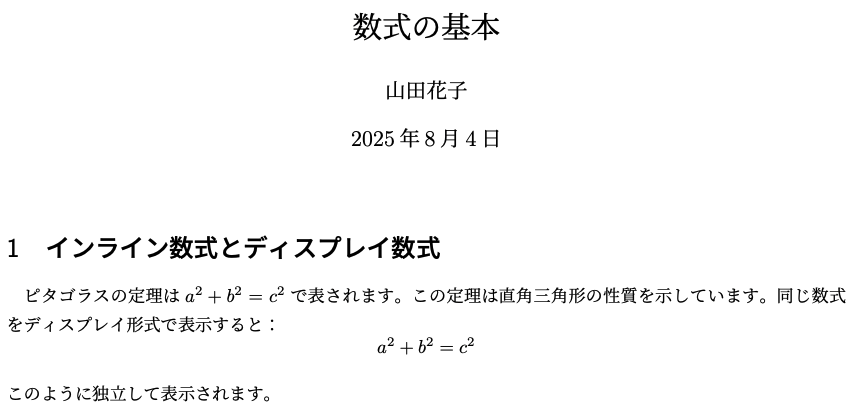
重要なポイント:
- インライン数式:文章の流れを邪魔しない小さな表示
- ディスプレイ数式:強調したい重要な数式を大きく表示
3. 基本的な数学記号
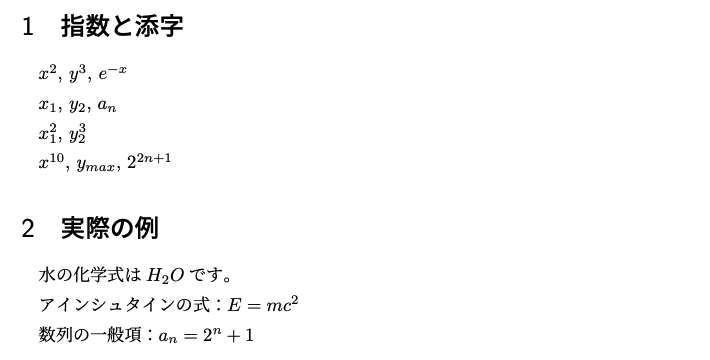
上付き文字と下付き文字
\documentclass[uplatex]{jsarticle}
\usepackage[utf8]{inputenc}
\usepackage{amsmath,amssymb}

\begin{document}

\section{指数と添字}

% Superscript (exponent)
$x^2$, $y^3$, $e^{-x}$

% Subscript (index)
$x_1$, $y_2$, $a_n$

% Combination of superscript and subscript
$x_1^2$, $y_2^3$

% Use {} for multiple characters
$x^{10}$, $y_{max}$, $2^{2n+1}$

\section{実際の例}

水の化学式は$H_2O$です。

アインシュタインの式:$E = mc^2$

数列の一般項:$a_n = 2^n + 1$

\end{document}
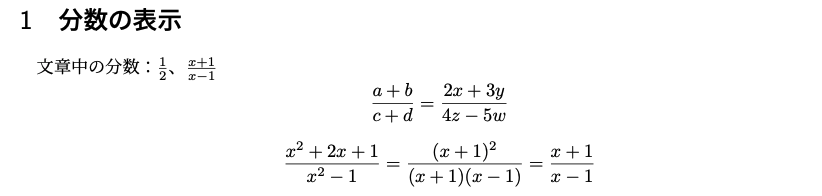
分数
\documentclass[uplatex]{jsarticle}
\usepackage[utf8]{inputenc}
\usepackage{amsmath,amssymb}

\begin{document}

\section{分数の表示}

% Inline fractions
文章中の分数:$\frac{1}{2}$、$\frac{x+1}{x-1}$

% Display fractions
\[
\frac{a+b}{c+d} = \frac{2x+3y}{4z-5w}
\]

% Complex fractions
\[
\frac{x^2 + 2x + 1}{x^2 - 1} = \frac{(x+1)^2}{(x+1)(x-1)} = \frac{x+1}{x-1}
\]

\end{document}
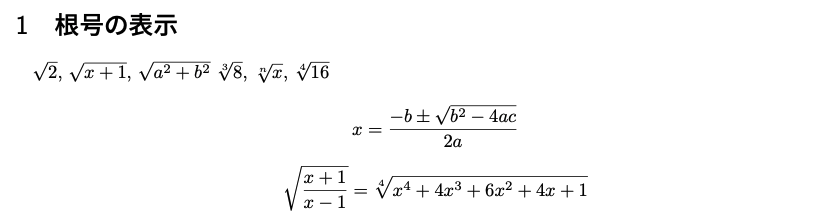
平方根と累乗根
\documentclass[uplatex]{jsarticle}
\usepackage[utf8]{inputenc}
\usepackage{amsmath,amssymb}

\begin{document}

\section{根号の表示}

% Square roots
$\sqrt{2}$, $\sqrt{x+1}$, $\sqrt{a^2 + b^2}$

% nth roots
$\sqrt[3]{8}$, $\sqrt[n]{x}$, $\sqrt[4]{16}$

% Display mode radicals
\[
x = \frac{-b \pm \sqrt{b^2 - 4ac}}{2a}
\]

% Complex radicals
\[
\sqrt{\frac{x+1}{x-1}} = \sqrt[4]{x^4 + 4x^3 + 6x^2 + 4x + 1}
\]

\end{document}
4. ギリシャ文字と数学記号
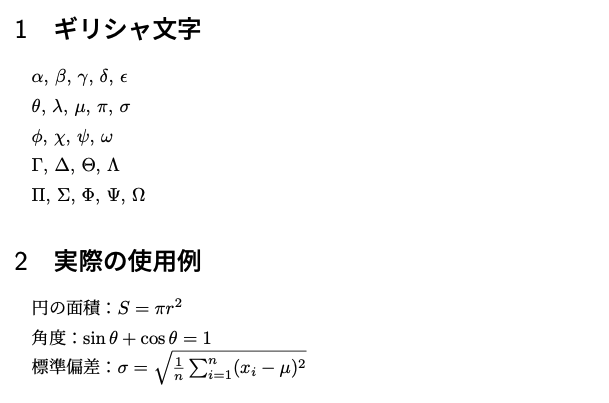
ギリシャ文字
\documentclass[uplatex]{jsarticle}
\usepackage[utf8]{inputenc}
\usepackage{amsmath,amssymb}

\begin{document}

\section{ギリシャ文字}

% Lowercase Greek letters
$\alpha$, $\beta$, $\gamma$, $\delta$, $\epsilon$

$\theta$, $\lambda$, $\mu$, $\pi$, $\sigma$

$\phi$, $\chi$, $\psi$, $\omega$

% Uppercase Greek letters
$\Gamma$, $\Delta$, $\Theta$, $\Lambda$

$\Pi$, $\Sigma$, $\Phi$, $\Psi$, $\Omega$

\section{実際の使用例}

円の面積:$S = \pi r^2$

角度:$\sin \theta + \cos \theta = 1$

標準偏差:$\sigma = \sqrt{\frac{1}{n}\sum_{i=1}^{n}(x_i - \mu)^2}$

\end{document}
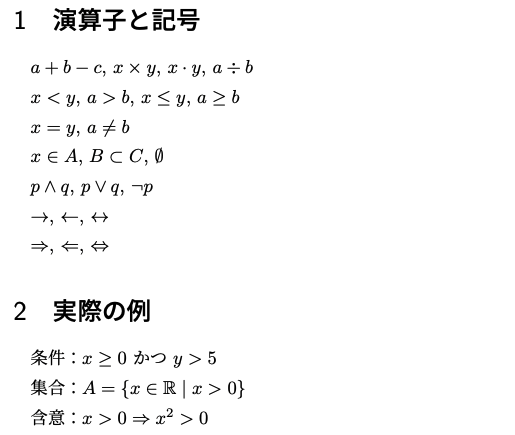
基本的な演算子と記号
\documentclass[uplatex]{jsarticle}
\usepackage[utf8]{inputenc}
\usepackage{amsmath,amssymb}

\begin{document}

\section{演算子と記号}

% Basic operations
$a + b - c$, $x \times y$, $x \cdot y$, $a \div b$

% Comparison operators
$x < y$, $a > b$, $x \leq y$, $a \geq b$

$x = y$, $a \neq b$

% Set symbols
$x \in A$, $B \subset C$, $\emptyset$

% Logic symbols
$p \land q$, $p \lor q$, $\neg p$

% Arrows
$\rightarrow$, $\leftarrow$, $\leftrightarrow$

$\Rightarrow$, $\Leftarrow$, $\Leftrightarrow$

\section{実際の例}

条件:$x \geq 0$ かつ $y > 5$

集合:$A = \{x \in \mathbb{R} \mid x > 0\}$

含意:$x > 0 \Rightarrow x^2 > 0$

\end{document}
数式内のスペース調整
数式内では、スペースは自動で調整されるので、空白を意図して入れたい時には、\quadや\qquadを用います。
\documentclass[uplatex]{jsarticle}
\usepackage[utf8]{inputenc}
\usepackage{amsmath,amssymb}

\begin{document}

\section{数式内のスペース}

% Normal spacing (automatic)
$x = y + z$

% Add space with \quad
$x = y \quad \text{かつ} \quad z = w$

% Add more space with \qquad
$x = y \qquad \text{または} \qquad z = w$

% Display equations with spacing
\[
f(x) = x^2 + 2x + 1 \quad (x \geq 0)
\]

\[
\sin^2 \theta + \cos^2 \theta = 1 \qquad \text{(ピタゴラスの関係)}
\]

\end{document}
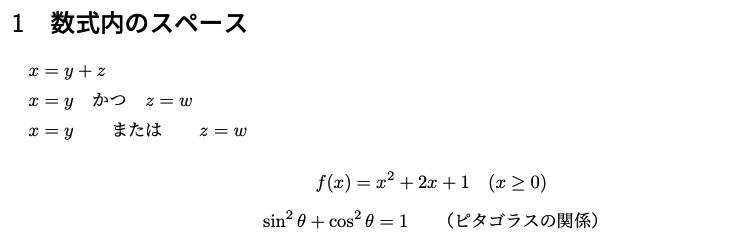
スペースコマンドの説明:
\quad:現在のフォントサイズと同じ幅のスペース\qquad:\quadの2倍の幅のスペース- 数式と文字の間隔調整や、条件式の表示に便利
5. 総和・積分・極限
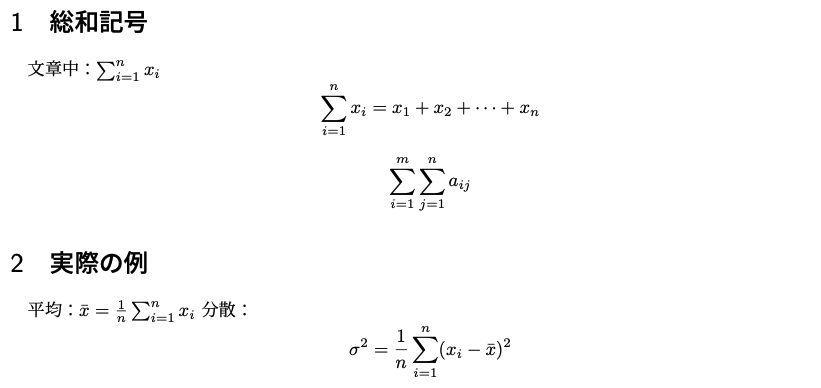
総和記号
\documentclass[uplatex]{jsarticle}
\usepackage[utf8]{inputenc}
\usepackage{amsmath,amssymb}

\begin{document}

\section{総和記号}

% Inline summation
文章中:$\sum_{i=1}^{n} x_i$

% Display summation
\[
\sum_{i=1}^{n} x_i = x_1 + x_2 + \cdots + x_n
\]

% Double summation
\[
\sum_{i=1}^{m} \sum_{j=1}^{n} a_{ij}
\]

\section{実際の例}

平均:$\bar{x} = \frac{1}{n}\sum_{i=1}^{n} x_i$

分散:
\[
\sigma^2 = \frac{1}{n}\sum_{i=1}^{n}(x_i - \bar{x})^2
\]

\end{document}
積分記号
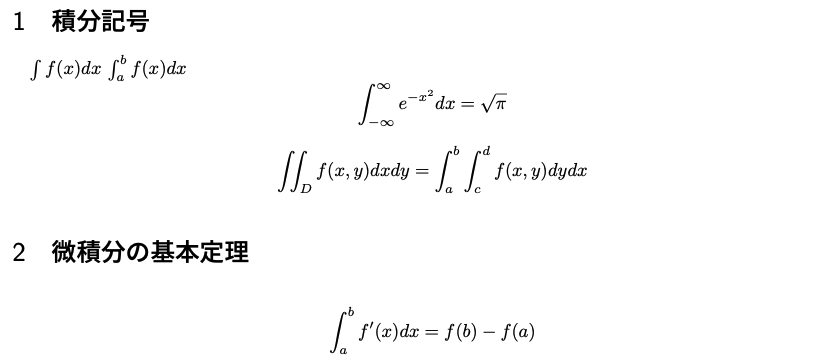
\documentclass[uplatex]{jsarticle}
\usepackage[utf8]{inputenc}
\usepackage{amsmath,amssymb}

\begin{document}

\section{積分記号}

% Indefinite integral
$\int f(x) dx$

% Definite integral
$\int_{a}^{b} f(x) dx$

% Display integral
\[
\int_{-\infty}^{\infty} e^{-x^2} dx = \sqrt{\pi}
\]

% Multiple integral
\[
\iint_{D} f(x,y) dx dy = \int_{a}^{b} \int_{c}^{d} f(x,y) dy dx
\]

\section{微積分の基本定理}

\[
\int_{a}^{b} f'(x) dx = f(b) - f(a)
\]

\end{document}
極限
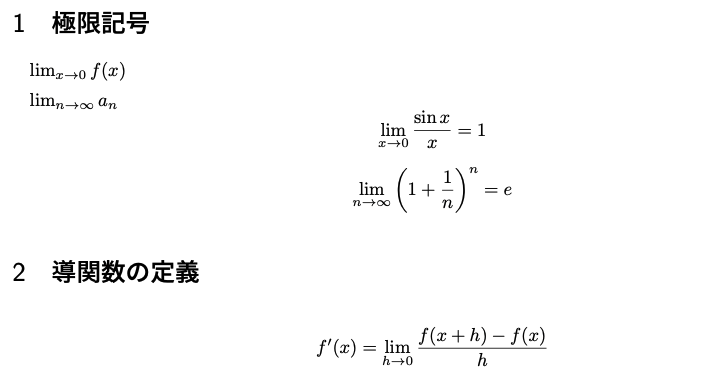
\documentclass[uplatex]{jsarticle}
\usepackage[utf8]{inputenc}
\usepackage{amsmath,amssymb}

\begin{document}

\section{極限記号}

% Basic limits
$\lim_{x \to 0} f(x)$

$\lim_{n \to \infty} a_n$

% Display limits
\[
\lim_{x \to 0} \frac{\sin x}{x} = 1
\]

\[
\lim_{n \to \infty} \left(1 + \frac{1}{n}\right)^n = e
\]

\section{導関数の定義}

\[
f'(x) = \lim_{h \to 0} \frac{f(x+h) - f(x)}{h}
\]

\end{document}
6. 数式環境の使い分け
複数行の数式
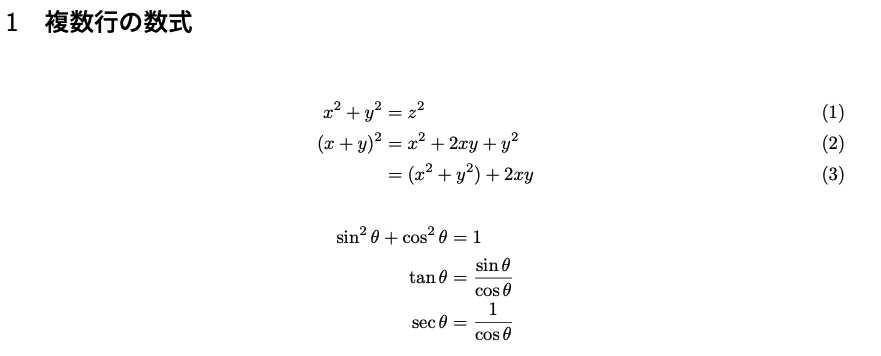
\documentclass[uplatex]{jsarticle}
\usepackage[utf8]{inputenc}
\usepackage{amsmath,amssymb}

\begin{document}

\section{複数行の数式}

% align environment (numbered)
\begin{align}
x^2 + y^2 &= z^2 \\
(x+y)^2 &= x^2 + 2xy + y^2 \\
&= (x^2 + y^2) + 2xy
\end{align}

% align* environment (unnumbered)
\begin{align*}
\sin^2 \theta + \cos^2 \theta &= 1 \\
\tan \theta &= \frac{\sin \theta}{\cos \theta} \\
\sec \theta &= \frac{1}{\cos \theta}
\end{align*}

\end{document}
重要:複数行数式にはamsmathパッケージが必要です。
7. 実践的な数式文書
数学レポートの例
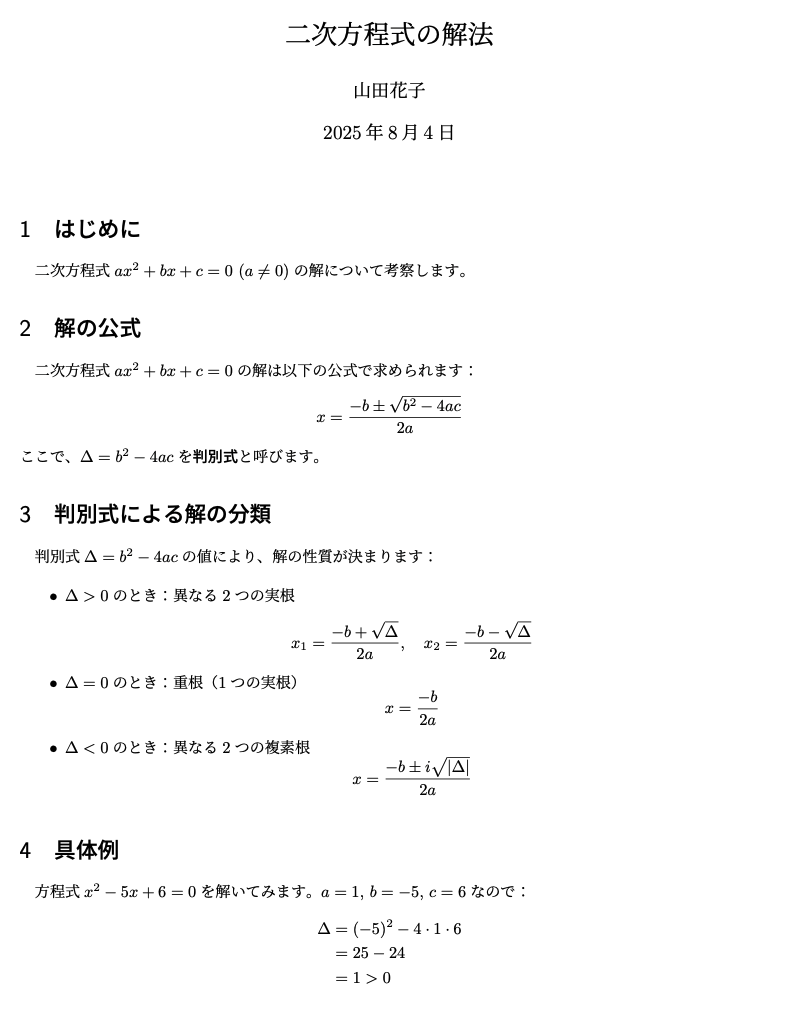
\documentclass[uplatex]{jsarticle}
\usepackage[utf8]{inputenc}
\usepackage{amsmath,amssymb}

\title{二次方程式の解法}
\author{山田花子}
\date{\today}

\begin{document}

\maketitle

\section{はじめに}

二次方程式$ax^2 + bx + c = 0$ ($a \neq 0$)の解について考察します。

\section{解の公式}

二次方程式$ax^2 + bx + c = 0$の解は以下の公式で求められます:

\[
x = \frac{-b \pm \sqrt{b^2 - 4ac}}{2a}
\]

ここで、$\Delta = b^2 - 4ac$を\textbf{判別式}と呼びます。

\section{判別式による解の分類}

判別式$\Delta = b^2 - 4ac$の値により、解の性質が決まります:

\begin{itemize}
\item $\Delta > 0$のとき:異なる2つの実根
  \[
  x_1 = \frac{-b + \sqrt{\Delta}}{2a}, \quad
  x_2 = \frac{-b - \sqrt{\Delta}}{2a}
  \]

\item $\Delta = 0$のとき:重根(1つの実根)
  \[
  x = \frac{-b}{2a}
  \]

\item $\Delta < 0$のとき:異なる2つの複素根
  \[
  x = \frac{-b \pm i\sqrt{|\Delta|}}{2a}
  \]
\end{itemize}

\section{具体例}

方程式$x^2 - 5x + 6 = 0$を解いてみます。

$a = 1$, $b = -5$, $c = 6$なので:
\begin{align*}
\Delta &= (-5)^2 - 4 \cdot 1 \cdot 6 \\
&= 25 - 24 \\
&= 1 > 0
\end{align*}

したがって、異なる2つの実根を持ちます:
\begin{align*}
x &= \frac{5 \pm \sqrt{1}}{2} \\
&= \frac{5 \pm 1}{2}
\end{align*}

よって、$x = 3, 2$

\section{まとめ}

二次方程式の解は判別式$\Delta = b^2 - 4ac$によって分類できることを確認しました。

\end{document}
8. 実習課題
課題:数式の再現
以下に示す数式と全く同じ表示になるようにTeX形式で入力してください:
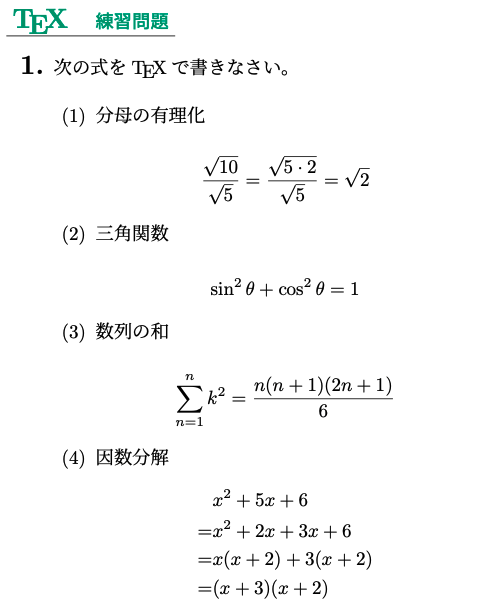
作成のポイント:
- 適切な数式環境(インライン・ディスプレイ)を選択
- 分数、平方根、総和記号、上付き文字を正しく使用
- 複数行の計算過程はalign*環境を使用
- 完全なTeX文書として提出(文書クラス、パッケージ、タイトル等を含む)
提出形式:
\documentclass[uplatex]{jsarticle}
\usepackage[utf8]{inputenc}
\usepackage{amsmath,amssymb}

\title{数式練習問題}
\author{山田花子}
\date{\today}

\begin{document}

\maketitle

\section{問題1:分母の有理化}
% ここに数式を入力

\section{問題2:三角関数}
% ここに数式を入力

\section{問題3:数列の和}
% ここに数式を入力

\section{問題4:因数分解}
% ここに数式を入力

\end{document}
9. よくあるエラーと対処法
エラー1:数式モードの閉じ忘れ
症状:$を開いたが閉じていない
% 間違い
文章中の数式$x^2 + y^2 = z^2で表されます。

% 正しい
文章中の数式$x^2 + y^2 = z^2$で表されます。
エラー2:複雑な上付き・下付き文字の{}忘れ
症状:複数文字の指数や添字で{}を忘れる
% 間違い
$x^10$, $y_max$

% 正しい
$x^{10}$, $y_{max}$
エラー3:align環境でamsmathパッケージを忘れる
症状:\begin{align}でエラー 対処:プリアンブルに\usepackage{amsmath,amssymb}を追加
エラー4:特殊文字の数式モード内使用
症状:数式内で%、&などを直接使用 対処:数式モードでは適切なコマンドを使用
10. 今日のまとめ
今日学んだこと:
- 2つの数式モード:インライン(
$...$)とディスプレイ(\[...\]) - 基本記号:上付き・下付き文字、分数、平方根
- ギリシャ文字:$\alpha$, $\beta$, $\pi$, $\theta$など
- 演算子・記号:比較演算子、集合記号、論理記号
- 高度な記号:総和、積分、極限
- 複数行数式:align環境(amsmathパッケージが必要)
次回予告:図表の挿入(graphicxパッケージ、includegraphics、tabular環境)を学びます。
コメント